Software runs my life

Category: Australia Page 6 of 12

Xero Accounting usability review

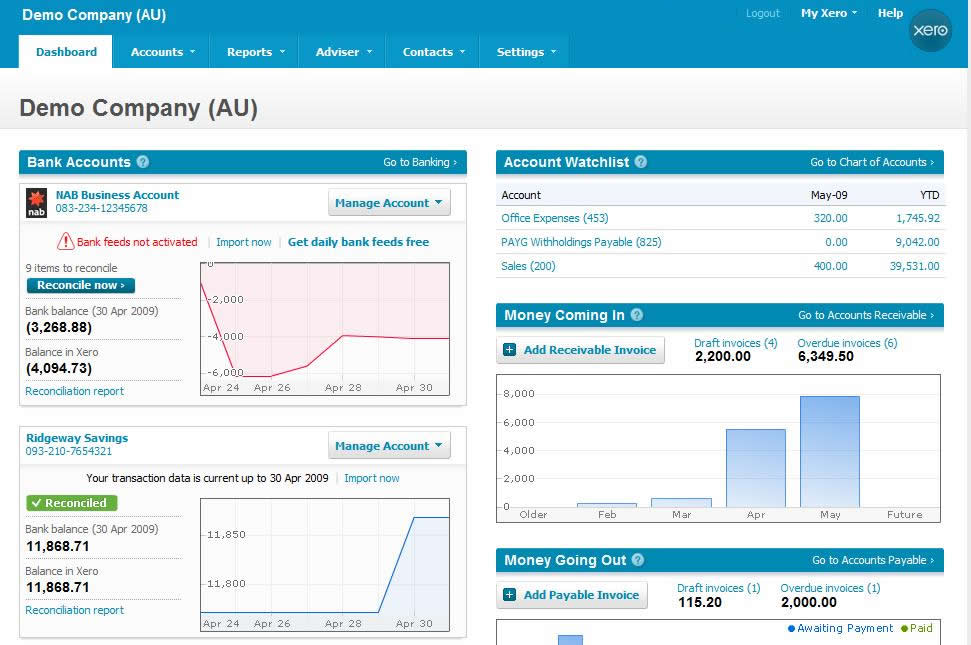
Xero touts itself as “The world’s easiest accounting system”. I don’t think they have much competition as far as usability goes in the accounting space, but I would guess that is because their competition probably think it is impossible to reduce accounting functionality into a usable package. I have had an extensive play with their demo, and I have seen a really surprisingly large number of unique and very usable elements to their user interface. Just when you think Web 2.0 usability techniques have plateaued, it is nice to be reminded that there are still plenty of boundaries to push. I just want to point out a few of my favourite interface elements of this beautifully designed interface.
The Xero Dashboard

The Xero Dashboard

When you first login you are greeted by a welcome message. This isn’t particularly unique, but it has nice touches. A warm dialog, pre-loaded sample data and a link to view the sample data straight away. They even have a different demo company set up for each country they operate in, taking into account local accounting rules etc. But that’s not all! Once you load the Demo Company data you can either take a tour, or tackle one of the top 10 tasks that people complete in Xero.

Tour or top 10 tasks

Getting Started Alert

I think this shows a good level of hand-holding, but also of understanding and targetting your customers.

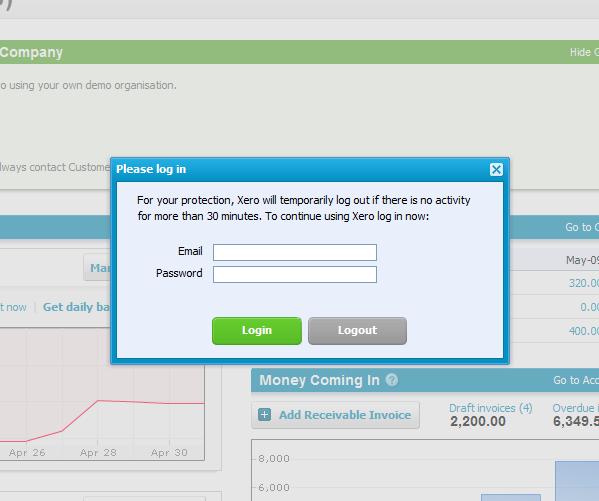
Another nice usability touch is the auto-logout function. Users generally hate the auto-logout 99% of the time, but it does save their bacon that final 1%. To make it as unbtrusive as possible Xero use a lightboxed login box when your 30 minutes is up (and it is good they actually display the limit here too). This makes logging back in a breeze, and teasing the user with all their content subtly appearing under the lightbox makes them feel that it isn’t a big process to dive back into the software again.
autologout is painless

Lightbox style Auto-Logout

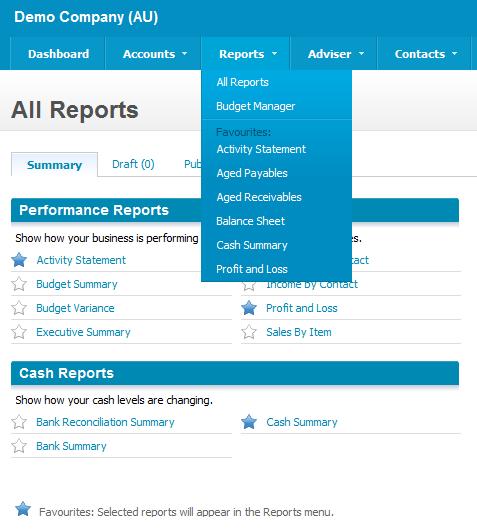
Reports are another area where usability is always difficult, in this case navigating to the reports that you use most regularly. Xero allows the user to simply click the star next to the report, and that report will then appear in the higher level Reports dropdown. You never have to see the full list of reports again!
Simple report navigation

Simple report navigation

It’s pretty minor, but it is a solution I never thought of to a problem I have faced for a while.

Finally one last idea that looks simple, but is actually very effective. The action button that performs more than one action:
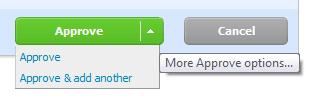
button dropdown

Consolidated Action Buttons

I like this because it keeps action buttons to a minimum, allowing them to be placed more consistently and concisely on a screen. It also forces you to make sure the actions on a page are related and required.

Other nice elements include inline help content throughout, consistent positioning and colouring of action buttons, good usage of white space around tabs and tables, the ability to save drafts or ‘publish’ data entry and the use of simple language (“Money coming in” rather than “Accounts Receivable”).

Well done Xero, you are now my usability reference whenever I get stuck! 🙂

What is the ACMA Blacklist?

The ACMA's Little Black Book

The ACMA's Little Black Book

The Australian Communications and Media Authority, ACMA, is the Government’s media regulating body. They work on a complaints basis, so if content is deemed to be R18+ or to contain excessive amounts of violence, drugs, terrorism etc. then they ban it. They cannot search for new material currently, but instead they review complaints submitted to them (by the public, law enforcement etc.) and then decide whether to ban it or not. This list of banned items is called the ACMA Blacklist.

So why are people so upset about this list? This filtering of content has worked well for movies, why not the internet as well? There are two main areas of thought here:

1) Why is the list black? – The content of the list is not publicly available. In the ACMA’s last report however, 781 overseas sites were added to the list:

  • 3 were pedophilia related
  • 410 were rated “RC – Child – Depiction”
  • 251 were X-rated
  • 117 “other” legal content

Previous years showed similar statistics. Wikileaks claims to have the list in full, although of course the ACMA or Senator Conroy would never admit that. This secrecy and the lack of transparency around the reporting process, judgement criteria and the Blacklist itself has people concerned. This was heightened by the leaked Blacklist containing links to popular sites such as YouTube, Geocities and Flickr, as well as plans by Senator Conroy to monitor the blogosphere for dissent.

2) How will it be enforced? – There is enforcement currently in place, Australian websites on the Blacklist can be forcefully taken down. Sites that even link to Blacklisted sites can be fined $11,000, although the irony is that you will never know your link is Blacklisted until it’s too late.

Senator Conroy has decided that the Government needs to be more proactive about this process however, they need to make the filtering mandatory at the ISP level (the company who provides your internet connection). He has setup a live trial with a number of lower tier ISP’s to test his theory, having been rejected by the three big players: Telstra, Optus and Iinet. This opposition is mostly at a technical level, basically arguing that the filter will substantially slow internet access and be largely ineffective (Peer to Peer, Email and other traffic will not be filtered).

Not Happy Jan? You can:

I just hope that they use the inevitably flawed trial as a way out of this sticky web they have weaved. Please try and focus on getting the National Broadband Network right before you cripple our current copper tangle.

Telstra's plan to deal with the NBN

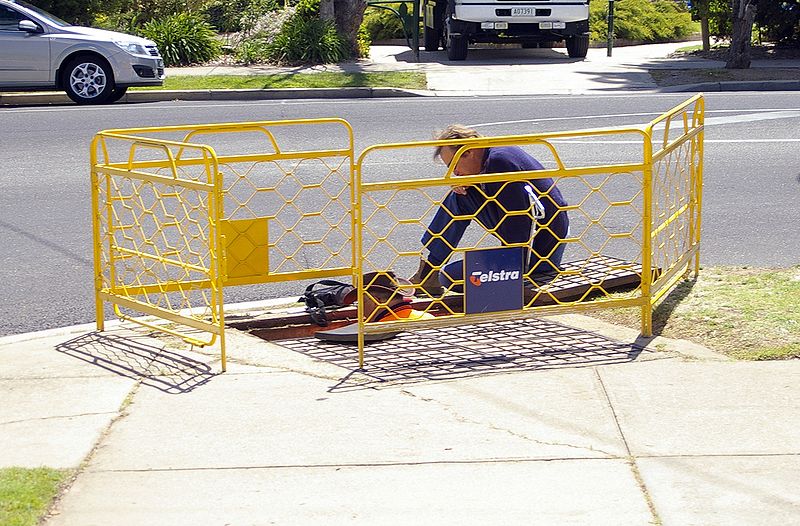
Telstra workers working hard

Telstra workers working hard

Telstra went all quiet after they got kicked out of the National Broadband Network tender, apart from a few whimpers about not caring anyway.

Everyone thinks the value is under the ground, in the pits around the nation. More specifically the value is in the copper, or rather it is if you are proposing the cheapest possible national roll out via VDSL. Telstra has been under investing in this asset for at least 20 years, so maybe the value isn’t really there?

One way or the other this asset will end up back in the NBN’s hand, and Telstra has always known that and milked it for every cent it can. It will eventually lose it though; through a Telstra’s lawyers dead hands, structural separation of Telstra, a massive compensation package or some combination of the above.

This is all part of the plan and a distracting safety net as far as Telstra is concerned. This was revealed this week with Telstra’s decision to upgrade its cable network to 100Mb/s, hidden in the fact that now they will deliver PSTN calls over the cable. Optus have been doing this for a while to avoid Telstra copper, but ironically Telstra is now trying to avoid copper too. They want to make sure no spare cent ends up in the hands of the new NBN owner.

So what’s next for Telstra? Telstra will lose the copper lines, keeping their high margin fibre customers (migrating them off copper PSTN lines) and getting a nice gift from the government to give them breathing space. Next steps are to capture as many high margin Metro customers as possible, and clean up the rest with NextG (maybe delivering VoIP over NextG?).

In the end though, Telstra’s plan will only work if the customer’s embrace it. A patriotic duty to support a national network will be hard pressed to overcome the Telstra brand and aggressive marketing and retailing. The economies of scale are being pressed from every side possible.

Page 6 of 12

Powered by WordPress & Theme by Anders Norén