

Software runs my life

Category: Google Page 4 of 5

Movember 2010

30 days worth of growth...

This is the second year that I have participated in Movember, a great initiative to raise money for men’s health. Google Australia put together a strong team to compete, so I had no excuse not to join the cause. If you don’t know what Movember is, here is the summary from their website:

Each year Movember is responsible for the sprouting of moustaches on thousands of men’s faces in Australia and around the world, with the sole aim of raising vital funds and awareness for men’s health, specifically prostate cancer and depression in men.

The program started in Australia, but has now spread to 9 more countries around the world. It’s really great to see Australia coming up with programs like Movember and Earth Hour that make a difference to the world.

If you would like to donate to my (poor) efforts to help, then that would be greatly appreciated! You can do so here: http://au.movember.com/mospace/227691/

YouTube Symphony 2011 in Sydney

YouTube Symphony 2011 has launched, and the Sydney Opera House has been announced as the new final location! The program is revolving around an APAC advertiser and location, so it is an extremely exciting program for the region. Make sure you try the Augmented Reality application in the “Experiment” section.

This excitement is being driven internally by a surprisingly large and distributed number of Australians based all around the world. I was at the launch event at the Opera House on Wednesday morning, and every Google employee who spoke was Australian! It was quite an inspiring moment for an Australian in IT like myself looking to make an impact globally. Working on the project has already been an amazing experience, and things have only just begun.

I guess Symphony is already achieving its goal to be a globally inspiring program.

Windows Mobile 6.5 fails to ActiveSync with Google Apps

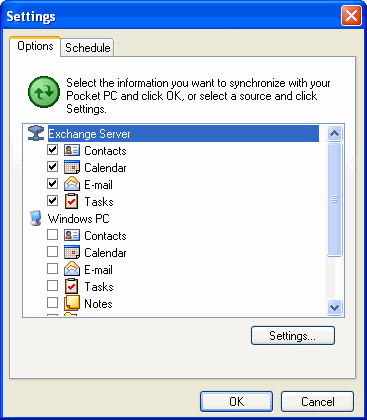
Setting up your Windows Mobile 6.5 phone for Google Apps should be simple, there are some clear instructions located here. However I have found that on some HTC Windows based phones the account creation process does not go so smoothly. After a bit of hunting around I found someone who had a fix for me. Here is the more detailed version of how to get it working:

  1. Connect your phone to your PC via the USB cable
  2. Disable all syncing with your PC by clicking Tools -> Options
  3. Click the Settings button and add your Exchange (Apps) account (do not check “Detect Settings”) and check Email syncing only
  4. Sync
  5. Edit the Exchange settings and check “Detect Settings”
  6. Sync
  7. Edit the Exchange settings again and check Calendar and Contacts (no tasks in Apps remember!)
  8. Sync again

And there you go! Not sure if this is a bug in Activesync, the phone or Apps, but it sure is annoying. At least it only occurs on setup, after that everything seems to keep up to date with no problems.

Page 4 of 5

Powered by WordPress & Theme by Anders Norén