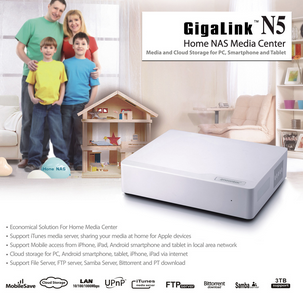
 The Noontec Gigalink N5 is a NAS media that has a few nice features – including DLNA, BitTorrent, a web interface and BYO hard drive.
The problem is that it doesn’t really work very well. The 30mm fan is noisy and isn’t variable based on case temperature, sometimes it doesn’t turn off, UPNP doesn’t work, you have to wipe your hard drive before installing, the noontec.com website got laced full of malware for a week… the list goes on. Basically it’s bargain basement electronics.
Anyway I managed to get in contact with one of their engineers, who provided me with an updated firmware package (which for some stupid reason is not listed on their website). The best part about this update over the stock firmware is that it includes an online firmware update function. This means hopefully this is the last manual firmware update you need to do. It really is a big improvement, although for some reason the UI is now increasingly inconsistent.
Click here to download the NAS_J1.04D_Ver2.1.7_USB2.0.bin firmware update for the Noontec Gigalink N5 (zipped up).
Ben
Hi Scott,I’ve recently bought one of these but I heck as like find out where to download the UI software (as opposed to the firmware). The link in the manual doesn’t work, mainly because of the malware attack you mention in your blog.
Don’t suppose you have a working link or a copy of the UI software you can post.
Thanks.
Scott Savage
The UI software is bundled in with the firmware, so update that and you should be fine.
Erica
Hi Scott. I’ve also just purchased the N5 and have downloaded the firmware you put here. When I extract it I have a file called NAS_J1.04D_Ver2.1.7_USB2.0.bin I do not know what to do from here to install/configure the N5. Am totally lost about what to do an am hoping you can help guide me. Thanks. 🙂
Erica
Probably should have said I’m running a Windows 8 machine.
Scott Savage
Normally you can go to http://n5/ (or your N5 IP address) and use the login/password to access the interface and update the firmware.
Stefan
Thanks Scott for your post.
I have a very similar NAS and a problem with the static IP.
So I flashed your FW -> and yes it is working!
But I have also found out, that the “Noontec N5” is also known as “TerraMaster U1” and there ist gives a Supportsction -> http://www.terra-master.com/en/Services/Software-Update/Index.html
Here it gives two different Firmwares, and one of them supports USB 3!
But without your post, I would never fix my problem with the static IP.
Thamks, Stefan
PS: sorry for my bad english 😉
Des
Has anyone tried upgrading their Noontec N5 (aka Terra Master U1) to USB 3? I’m currently on firmware version “NAS-1Bay_J1.04Z_L1.04T_Ver2.34_USB2.0”. If anyone has tried it successfully, would love to hear from you. Cheers!
Troy
Hey Des, you don’t happen to know where I can find the NAS-1Bay_J1.04Z_L1.04T_Ver2.34_USB2.0 update for the Terra Master U1 /Noontec N5? Can’t find any sport for the device now. Picked it up cheaply recently. Thanks in advance!
Troy
Coenraad
Hey guys, I’m trying to create my own firmware for this device so that I can run my own software on there. The more firmwares I can get, the better.
@Des – can you dropbox that firmware for us?
BTW you can not upgrade USB2 to USB3 unless the hardware supports it, and a quick look at the board says it doesnt.
The buggers sanded off the information off the main chip!
PeterP
I was using the noontec n5 for my sonos music. However the share looks like it have disappeared. The drive space tells me that the data is still on the disk, however I can’t access the data.
Can you please help me out.
Scott Savage
I had a similar problem and lost access to all my data, although the HDD still seems to be full. I think you would need to pull the HDD out and examine from another computer directly.